Related links
 Homepage
 User documentation
 Uživatelská dokumentace
Framework Core functionality
- AyMINE Framework Server
- The AyMINE licence model
- FRM Module Releases
- Configuration of the user-defined fields
- Client-Defined attributes
- Server scripting & Automation
- Strings and translations
- User sessions
- Import collection of objects
- Multi tenant Architecture
- Export collection of objects
- System messaging
- System Rights
- File Management with End-to-End Encryption
- Server configuration for large files
SOA / Event Management
Support for Service Object Architecture and Internal Event ManagementModule - support for management
Front-End Scripting
System Management
- SaaS Management Module
- System Module Release Overiew
- Management of the SaaS service client
- Encryted wallet storing access keys for data vault
- Definition and Management users in the SaaS system
- Management of the system users
- System right management
- System role is how user administrator sets the rights
- File access, storing and locking
- Communication geateways
- Private Object Marks, Sign & Notes
Task Management Module
- About TSK module
- Support for voting and decision management
- Support and implementation notes for FMEA
- Support for the Methodology Management
- Project Methodology Support
- Project Roles - Data model and implementation notes
- Actions and Meeting Agenda
- Description of person and supplier competencies
- Business event
- Problem & Helpdesk management support
- TSK Module releases
- User Reminder
Task & Task pattern
Mobile & Web Application
- Client-Side Scripting using API
- Application Object Structure
- Clipborad Link - Cliplink
- fclip
- drag-drop
- AyMINE Application
- objectdefinition_inlineedit
- clientprogramming
- mobileapplication
- languagesupport
- objectdefinition_multiupdate
- Object API – object <g>
- clientprogramming_fevallanguage
- clientprogramming_fevaluser
- objectdefinition_viewdefinition
- offlineobjects
- System console
- Runtime debugging
- objectdefinition_detailview
CMS - Content Management & Web API services
FI - Finance Management
CRM Module Customer-Relationship Management technical & implementation notes
Sales & Asset management
Sales related services
Description of a part of the AM module - sales partSystem event and Event Instance
- The System Event related objects
- System Event Handler
- System Event
- Result of the event handler processing
System event is the principal object of the SOA – internal system communication and automation.
The System Event related objects
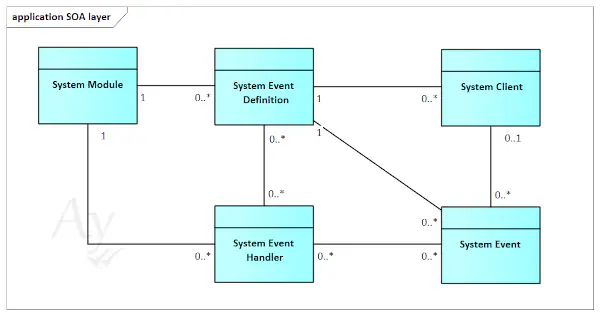
The following model represents basic objects and structures related to the event processing:
System Event Definition
Description of the event. Loaded from the module configuration file. It can limit event application only for some clients.
All events managed by SOA shall have its definition by some module. Definition is the basic description of the event processing and so non-defined event cannot have processing defined.
System Event Handler
Modules publish handlers that are registered by the module configuration. They can also be limited to some client(s) only.
Handlers have defined priority. When even occurs, handlers are processed one by one according to the priority order.
Handler is the back-end defined method. It returns result about the processing result. The result can block processing of other handlers and so handlers with lower priority can be blocked by handler with higher priority.
System Event
The system Event object is the instance of object defined by the System event definition. Event is raised internally by the SOA Event manager or by system or business module.
Event raising options:
-
Synchronous: Processors are immediately started and the caller receiver result of the processing. If synchronous event is activated within the user-session, user waits until its processing. Synchronous events are used for implementation of the module-specific reaction to the event that is part of the master process.
-
Asynchronous: Event is stored to the list and started independently. Processing of the caller is finished before processing of the event is activated
-
Time-postponed: Event can be raised with the specified time / day. Such event is stored in the queue and activated in the requested time.
Result of the event handler processing
Event handlers shall inform about the processing result. They can complete processing in the various state, return
- Complete with Success (OK) result. Only Synchronous event can return attributes to the caller. (Asynchronous event are not limit in the result but their return attributes are disregarded and make no sense)
- Fails with an exception – that is processed by the SOA Event Manager, logged and administrator have overview of errors in the SOA console.
- Return error status and message in response.