Related links
 Homepage
 User documentation
 Uživatelská dokumentace
Framework Core functionality
- AyMINE Framework Server
- The AyMINE licence model
- FRM Module Releases
- Configuration of the user-defined fields
- Client-Defined attributes
- Server scripting & Automation
- Strings and translations
- User sessions
- Import collection of objects
- Multi tenant Architecture
- Export collection of objects
- System messaging
- System Rights
- File Management with End-to-End Encryption
- Server configuration for large files
SOA / Event Management
Support for Service Object Architecture and Internal Event ManagementModule - support for management
Front-End Scripting
System Management
- SaaS Management Module
- System Module Release Overiew
- Management of the SaaS service client
- Encryted wallet storing access keys for data vault
- Definition and Management users in the SaaS system
- Management of the system users
- System right management
- System role is how user administrator sets the rights
- File access, storing and locking
- Communication geateways
- Private Object Marks, Sign & Notes
Task Management Module
- About TSK module
- Support for voting and decision management
- Support and implementation notes for FMEA
- Support for the Methodology Management
- Project Methodology Support
- Project Roles - Data model and implementation notes
- Actions and Meeting Agenda
- Description of person and supplier competencies
- Business event
- Problem & Helpdesk management support
- TSK Module releases
- User Reminder
Task & Task pattern
Mobile & Web Application
- Client-Side Scripting using API
- Application Object Structure
- Clipborad Link - Cliplink
- fclip
- drag-drop
- AyMINE Application
- objectdefinition_inlineedit
- clientprogramming
- mobileapplication
- languagesupport
- objectdefinition_multiupdate
- Object API – object <g>
- clientprogramming_fevallanguage
- clientprogramming_fevaluser
- objectdefinition_viewdefinition
- offlineobjects
- System console
- Runtime debugging
- objectdefinition_detailview
CMS - Content Management & Web API services
FI - Finance Management
CRM Module Customer-Relationship Management technical & implementation notes
Sales & Asset management
Sales related services
Description of a part of the AM module - sales partSOA System Management Console
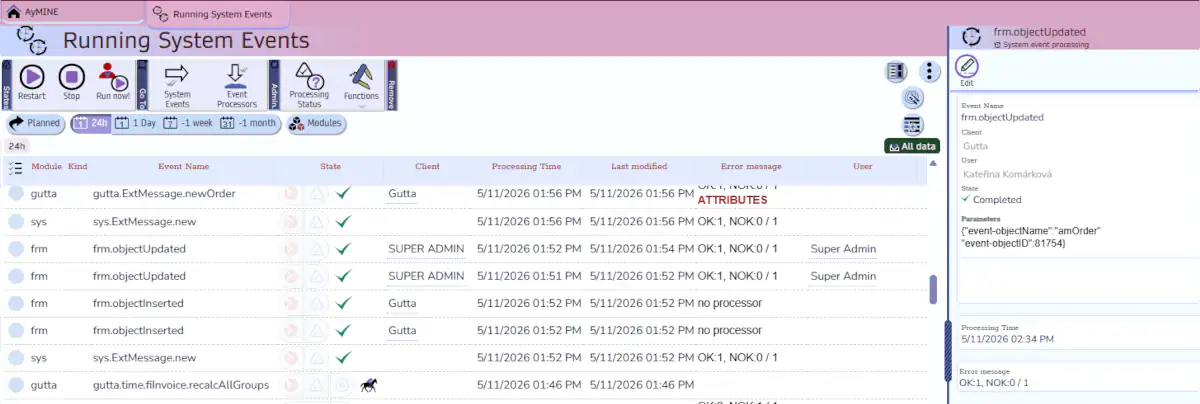
AyMINE SOA Management console provides user interface for complete control of the SOA layer behaviour and partial control of the processing.
You can click on the screenshot to get larger detail.
Event history overview
List of events displays queue of the processed events. Generally the queue describes both historical and future processing. However, it does not included future events raised internally by the time stamps because those events are generated in the planned time.
Historical events provides information about the processing results. System manager has complete control what is running in the background of the system.
Manager can:
- Restart processing of the event stopped on the exception
- Complete stop background processes
Back-end systeme emergency stop
For long-time back-end tasks that are running over many records, administrator can send a signal that they should stop. The signal is available to all handler processes.
The handler routines should handle the signal and complete / reject transaction and stop as soon as possible. The signal has high priority and cannot be blocked by other operations. However, system does not kill process of the operation automatically since it would mostly cause more problems that a few seconds necessary for controlled shutdown.
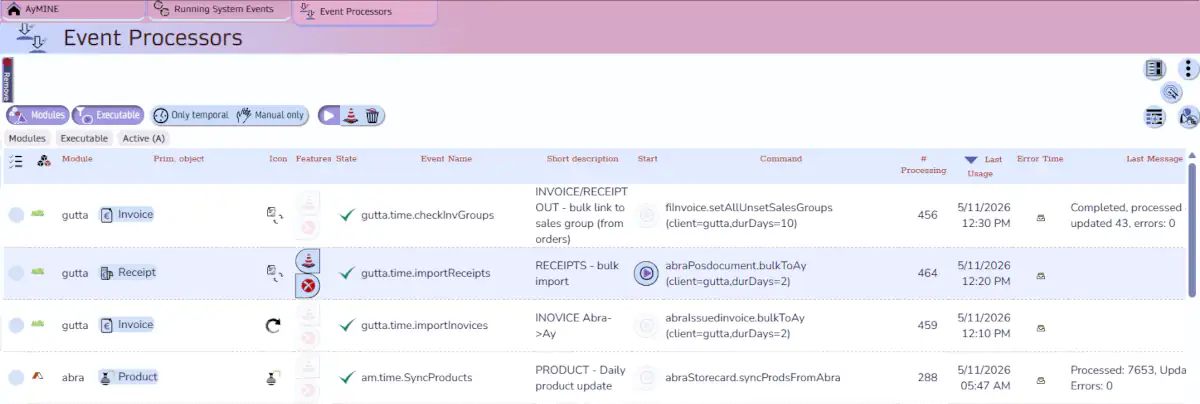
Event handlers
List of event processor provide information
- What processors are installed and their parameters
- Partial history
- How many times they were processed
- Last time of the process
- Last error information
Event handlers operational management
System administrator can temporarily or permanently stop the handler processing. If handler support manual start, system administrator start them from this list.
System administrator can even edit the attributes of the processors. This shall be used in caution because it dynamically manage the system behaviour.
All changes provided by system administrator from the console are overwritten during the module reload.