Related links
 Homepage
 User documentation
 Uživatelská dokumentace
Framework Core functionality
- AyMINE Framework Server
- The AyMINE licence model
- FRM Module Releases
- Configuration of the user-defined fields
- Client-Defined attributes
- Server scripting & Automation
- Strings and translations
- User sessions
- Import collection of objects
- Multi tenant Architecture
- Export collection of objects
- System messaging
- System Rights
- File Management with End-to-End Encryption
- Server configuration for large files
SOA / Event Management
Support for Service Object Architecture and Internal Event ManagementModule - support for management
Front-End Scripting
System Management
- SaaS Management Module
- System Module Release Overiew
- Management of the SaaS service client
- Encryted wallet storing access keys for data vault
- Definition and Management users in the SaaS system
- Management of the system users
- System right management
- System role is how user administrator sets the rights
- File access, storing and locking
- Communication geateways
- Private Object Marks, Sign & Notes
Task Management Module
- About TSK module
- Support for voting and decision management
- Support and implementation notes for FMEA
- Support for the Methodology Management
- Project Methodology Support
- Project Roles - Data model and implementation notes
- Actions and Meeting Agenda
- Description of person and supplier competencies
- Business event
- Problem & Helpdesk management support
- TSK Module releases
- User Reminder
Task & Task pattern
Mobile & Web Application
- Client-Side Scripting using API
- Application Object Structure
- Clipborad Link - Cliplink
- fclip
- drag-drop
- AyMINE Application
- objectdefinition_inlineedit
- clientprogramming
- mobileapplication
- languagesupport
- objectdefinition_multiupdate
- Object API – object <g>
- clientprogramming_fevallanguage
- clientprogramming_fevaluser
- objectdefinition_viewdefinition
- offlineobjects
- System console
- Runtime debugging
- objectdefinition_detailview
CMS - Content Management & Web API services
FI - Finance Management
CRM Module Customer-Relationship Management technical & implementation notes
Sales & Asset management
Sales related services
Description of a part of the AM module - sales part Web Page
Web page describes single web page on the web portal.
Web page supports various ways, how the real web page could be created:
- Page could be stored as a html code.
- Page could have markdown definition. Generated page is cached for faster response.
- It supports common page definition using several page blocks linked together using the template. (This is the most common but the slowest page definition, however the module creates page caches for faster repeatable response.)
- Page could be generated by the php code with or without linked blocks. PHP code is defined by the linked page script.
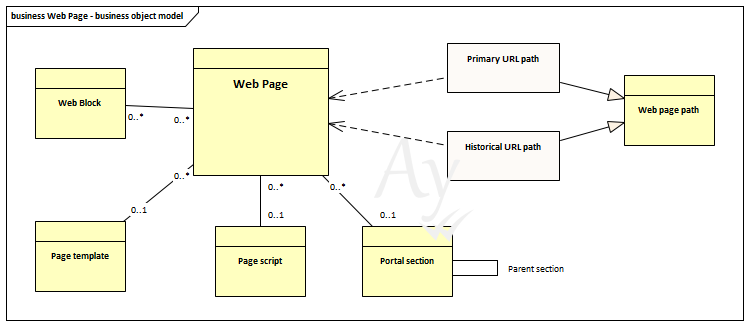
Web page related objects
Page template
Page template is used to complete the page from blocks. It is used in case that page is defined as a collection of more blocks
Web block
One or more blocks could be placed on the page. If page combines blocks, it shall have a template or scrip that creates page from blocks.
Blocks that are placed to a page are visible on the page only if the template use them.
Page script
Script is an alternative to the page. Script shall be stored and supported by server and works similarly as a template except that it has more flexibility to build up the page freely.
Portal section
Sections defines the web structure. Page could get the primary URL only when placed to some portal section.
Primary URL path
Primary path defines page URL from section.
Primary path is defined by section but it is stored as an independent object. Although primary path is partly duplicity information with section it is important speed improvement that support quicker portal response time.
Historical / Redirected URL path
Historical paths redirect old URL paths to the page.
Page caching
Pages created from markdown and template sources are cached directly by the module.
Cache management
The web page cache doesn't require any user management.
- Cached page is created during the first client access to the page.
- Page cache is automatically deleted when user change any part of the page – page definition or any of the linked objects (template, script or block).
- Cache could be disabled for script in case that script uses some arbitrary information