Related links
 Homepage
 User documentation
 Uživatelská dokumentace
Framework Core functionality
- AyMINE Framework Server
- The AyMINE licence model
- FRM Module Releases
- Configuration of the user-defined fields
- Client-Defined attributes
- Server scripting & Automation
- Strings and translations
- User sessions
- Import collection of objects
- Multi tenant Architecture
- Export collection of objects
- System messaging
- System Rights
- File Management with End-to-End Encryption
- Server configuration for large files
SOA / Event Management
Support for Service Object Architecture and Internal Event ManagementModule - support for management
Front-End Scripting
System Management
- SaaS Management Module
- System Module Release Overiew
- Management of the SaaS service client
- Encryted wallet storing access keys for data vault
- Definition and Management users in the SaaS system
- Management of the system users
- System right management
- System role is how user administrator sets the rights
- File access, storing and locking
- Communication geateways
- Private Object Marks, Sign & Notes
Task Management Module
- About TSK module
- Support for voting and decision management
- Support and implementation notes for FMEA
- Support for the Methodology Management
- Project Methodology Support
- Project Roles - Data model and implementation notes
- Actions and Meeting Agenda
- Description of person and supplier competencies
- Business event
- Problem & Helpdesk management support
- TSK Module releases
- User Reminder
Task & Task pattern
Mobile & Web Application
- Client-Side Scripting using API
- Application Object Structure
- Clipborad Link - Cliplink
- fclip
- drag-drop
- AyMINE Application
- objectdefinition_inlineedit
- clientprogramming
- mobileapplication
- languagesupport
- objectdefinition_multiupdate
- Object API – object <g>
- clientprogramming_fevallanguage
- clientprogramming_fevaluser
- objectdefinition_viewdefinition
- offlineobjects
- System console
- Runtime debugging
- objectdefinition_detailview
CMS - Content Management & Web API services
FI - Finance Management
CRM Module Customer-Relationship Management technical & implementation notes
Sales & Asset management
Sales related services
Description of a part of the AM module - sales partFile management with end-to-end encryption
- End-to-end Encryption Integration to File Management
- Risk in the file encryption: User's device
- Difference between server encryption and end-to-end encryption
- File-sharing basic services
AyMINE Framework integrates end-to-end file encryption to the download / upload process on-the-fly.
In the moment you have file linked with record in the data vault, file encryption runs in the process automatically.
End-to-end Encryption Integration to File Management
Upload process
The following scheme presents how the on-the-fly file encryption is integrated (you can click on image to get it larger):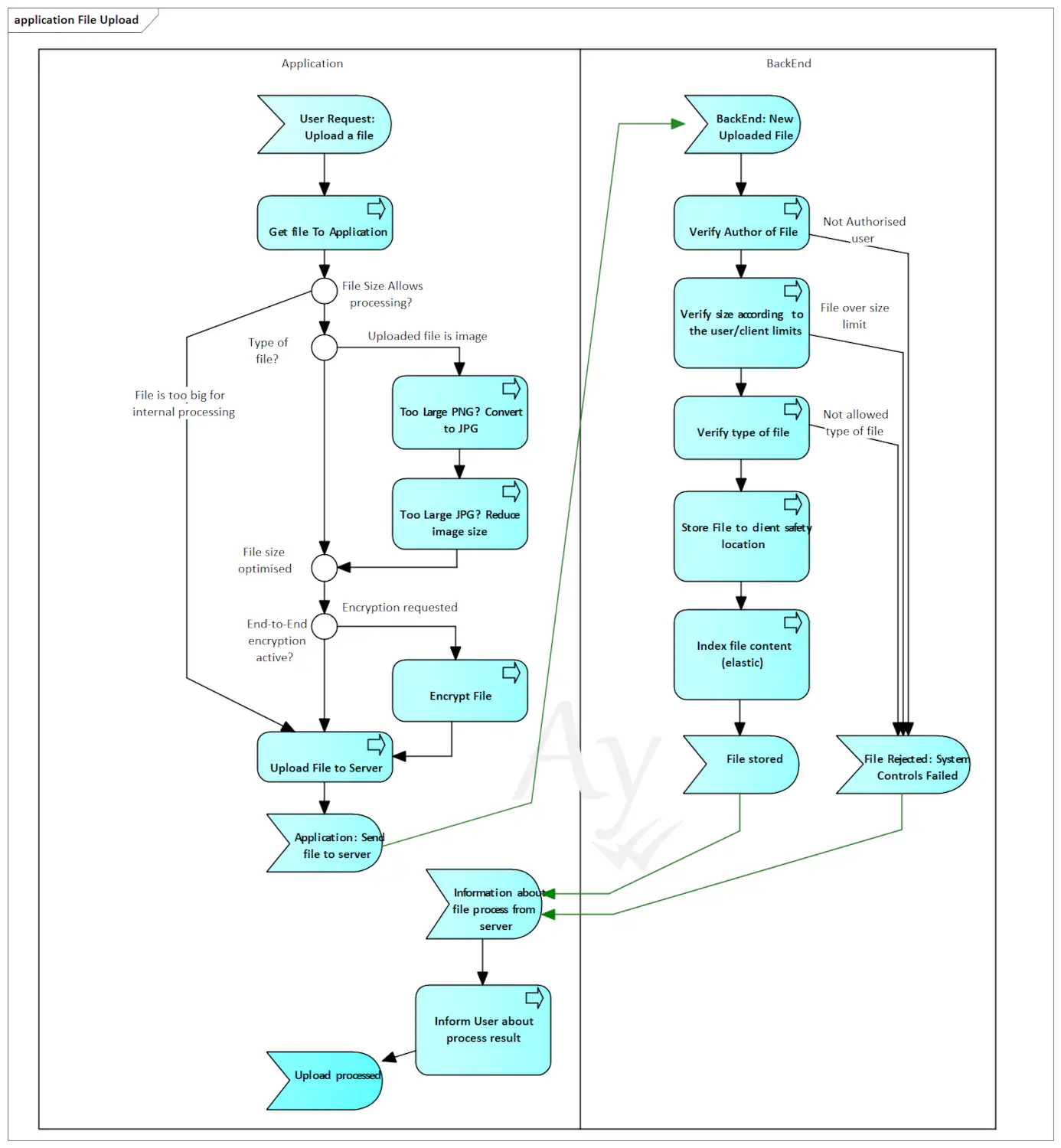
Not all files are processed
The upload process controls files and process them before uploading the server. Files are not send directly by system functions, although in the end of process, regular hppts upload is used via the fetch method.
What processing is managed by application:
- It reduces size of the image. It is useful especially when it takes pictures directly from the phone camera. It is also used for large screenshot. Each client could have individual limit for image size
- It encrypt file, if it is linked with record that is stored in the vault. Files are encrypted using the same vault as the file's master record.
Internal processes requires repeatable in-memory operation with file both on client and server. It could consume too much resource for huge files (packed archives or video). Therefore, the system has set limit for processed files. If user has higher limit allowed, larger files are uploaded / downloaded without end-to-end encryption. (Sure, that is still https communication encryption active.)
Common limits for clients:
- Users can upload files up to the 300MB
- Files up the 30MB can be on-the-fly encrypted.
Download process
Contravise to upload, download decrypt file during the download: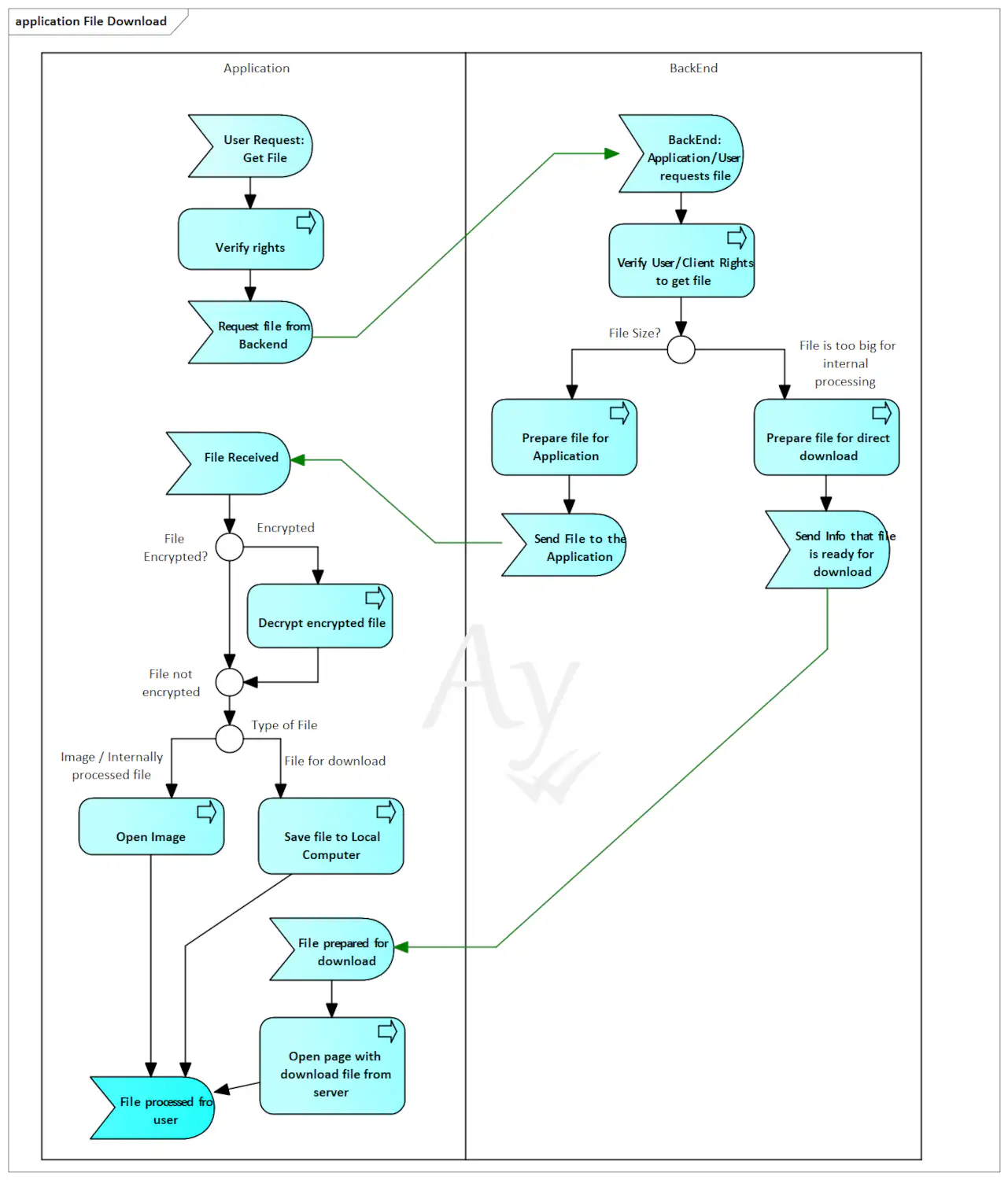
Files are processed directly after the download. Download of smaller files (to the 30MB limit) is managd by application internally and they are on-the-fly processed before they are stored.
Files with size above the limit for processing are downloaded in a separate connection directly to the server. They are not processed by application when downloaded.
Risk in the file encryption: User's device
AyMINE decrypt files on-the-fly and saves them decrypted. It does not protect file when it is stored in the computer. Even when user deletes a file, it is mostly a year or longer in the trash.
End-to-end file encryption gives you 100% certainty that on one else get access to the file. Neither administrator, nor the cloud service provider. But it does not protect against user's mistake or non-properly managed local computer.
Recommendation: Whenever possible, store sensitive, private or critical data in AyMINE records, not in files. Although both is encrypted and handled by AyMINE in the same ways and the same level of safety overall lifecycle process of encrypted records in system is much more safe that files that stay also outside the system.
Server file encryption vs. End-to-end Encryption
Difference between server encryption and end-to-end encryption
Almost all current cloud storages encrypt files on disk. Even MS Share Point have files encrypted, but:
- Files are encrypted on server. Server has access to them un non-encrypted format
- User with system privileges have access to the files
- Service provider has access to files
- Whenever got access to the system has although access to the files.
In a nutshell without end-to-end file encryption you have no guarantee who has access to you file. That's why AyMINE Framework provides end-to-end encryption.
File-sharing basic services
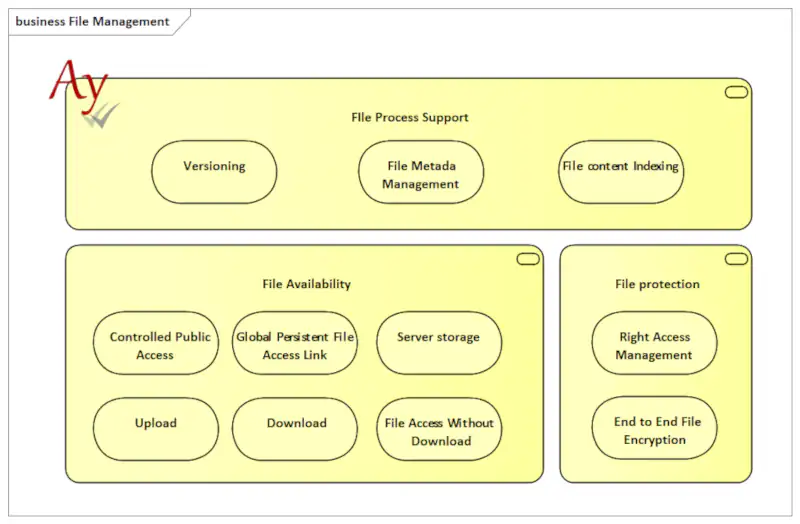
Image presents basic services provided by file-sharing system.